Showing posts with label free resources. Show all posts
Friday, October 29, 2010
Great resource for career info for students
The CBIA (Connecticut Business and Industry Association) has a great site with education resources. One part of it is called "Career Pathways." In this section, there are videos and teacher's guides for helping students learn about different careers. I've used them and the resources are excellent. For the engineering career one, they have interviews with engineers and follow them on their daily work. The teacher guides have lesson ideas and student resources that make these very easy to use.
I recommend them to career teachers and counselors as well as class room teachers. You can use these to connect what you are teaching to real world careers.
The career areas are: Energy and Green Technology, Engineering, Health and Biosciences, and Manufacturing. Even though it is geared towards Connecticut, anyone can use these resources.
Free Apps - easily find free software for your computer
FreeApps is a web site that aggregates free software and lets you download it all from one site. You can choose free software ranging from web browsers, to email and communications, to utilities like anti-virus and firewall. Most of the free software they offer is well known, such as Firefox, AVG, Adobe Reader, and the like, but this site makes it easy to find it all in one spot. It also bundles the software into one file for downloading. There is a very large variety of software available. See below for some of them.
Teachers can use this themselves, but it is also a very good resource to let your students know about so that they can easily find some of this great free software that is out there.
Tuesday, October 19, 2010
CECA 2010 Conference
Yesterday, I attended and presented at CECA (CT Educators Computer Assoc) conference in Hartford, CT.
It was a great conference with lots of great sessions, discussions, vendors, and of course networking.
If you couldn't attend, here are some links for you (and try to get there next year!)
Gary Stager - Keynote Address - virtual handout - http://stager.org/hartford/
Presenter Materials and handouts - http://www.ceca-ct.org/page.php?pid=111
(not everyone submitted things) My handouts are available on there.
Richard Byrne's presentations are available on his site - http://www.freetech4teachers.com/
Can't wait for next year's!
(And Friday, I'll be presenting and attending TechForum NY. I hope I'll see some of you there!)
Thursday, October 14, 2010
Great Web 2.0 Resources for Students
There are some really great Web 2.0 Resources for Students out there that can help students with their school work, getting organized, and using other Web 2.0 resources. Here is a list of some of my favorites.
TRACKCLASS:

Trackclass is a great, free resource for students. The site allows students to track their classes and assignments, and even will send reminders (email or SMS) for upcoming assignment due dates and test dates. There is also a note taking utility so students can take notes on it if they have a computer in school, or transcribe notes later. You can even attach files to each class and assignment to keep things organized. It is a great way for students to stay organized.
There is also a version for mobile phones and the iPhone, so students can stay organized no matter where they are.
I found it very easy to use, with a great help section. I wish they had this when I was in school! I was even thinking that teachers could use this too.

Shoshiku is another free class organizer, similar to Trackclass. It has a calendar, notes, task list, and reminder system like Trackclass. It is not as full featured, in my opinion, as Trackclass, but it is easy to use and some students may like it better than Trackclass.
Dweeber is a homework collaboration site that also has tools to help students learn better. It is described as a homework social network. Students sign up, for free, and can add their friends, known as "dweebs" to their network. Students can work on homework together and help each other out. It even as a virtual whiteboard so that they can work together just as if they were in the same room. There is a message center, study sessions, and even a place to post links to web sites that you find helpful in doing your work.
This is a great resource for students who can't get together physically to work on homework or projects.
Google Student Blog:
I am a huge user and fan of Google's many applications and their use in education. I use Blogger for this blog and my classroom blogs, Google Sites for my classroom site, Google Docs, Google Earth, iGoogle and much more with my students and for my own use. I show my students Google's applications because they are easy to use, useful, and free.
Google recently launched the Google Student Blog. This blog site is a great resource for students who use Google's products. It includes information, updates, how-to's, tips, and much more on how to use Google's applications as a student. If your students use Google's products, they should be reading the Google Student Blog.
I am a huge user and fan of Google's many applications and their use in education. I use Blogger for this blog and my classroom blogs, Google Sites for my classroom site, Google Docs, Google Earth, iGoogle and much more with my students and for my own use. I show my students Google's applications because they are easy to use, useful, and free.
Google recently launched the Google Student Blog. This blog site is a great resource for students who use Google's products. It includes information, updates, how-to's, tips, and much more on how to use Google's applications as a student. If your students use Google's products, they should be reading the Google Student Blog.
Scribblar:

Scribblar is an online meeting room / white board. Students can use it to collaborate on projects, teachers can tutor via the computer, and teachers can use it for collaborative meetings and projects.
Scribblar gives the users a virtual white board on the screen and writing tools to create text, lines and shapes. They can even add images.
There is also a chat window on the side bar so that users can talk to each other while working. There is even a live chat system if you have a microphone and speakers.
I see students using this to work on homework problems together. Teachers could use this to help students with homework after school or on the weekends.
Scribblar can now support PDF files. Free users can upload PDFs with up to 5 pages. Your uploaded PDF will be turned into an editable image in Scribblar.
Evernote

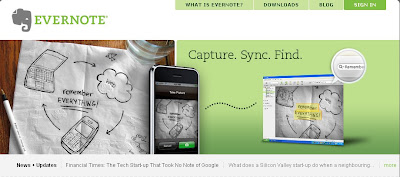
Evernote is a great, free resource that allows you to easily capture information using whatever device or operating system you use. It then makes this information accessible and searchable from anywhere. Their tagline: Remember Everything.
You can capture task lists, notes, web pages, white boards, business cards, pictures, and even clip web pages to Evernote.
You can download a desktop version of the software, for free, which will sync to the Evernote web server, or you can just access it through the internet on their web page. You can also access it through a mobile device. They have downloadable applications for the iPhone, Blackberry, Android, and Windows Mobile devices. You can also access their mobile website on any web-enabled phone.
You can create new notes via desktop, web, or mobile version. You can also use your camera phone or web cam to take a snapshot and Evernote can even recognize the text in the image. You can also email notes, clip web pages, record audio notes, and scan papers, receipts and more into Evernote.
Their website has easy to follow instructions and help sections. Students can use Evernote to take notes in class, share notes with other students, capture notes off of a whiteboard or poster using their smartphone camera, and much more.
Dropbox

Dropbox is a service that allows you to sync your files on your computer with their system as a backup. This also allows you to access the files anywhere. You can also sync the files across multiple computers. This means that you have automatic backup of your files and 24/7 access to your files. I have it set up to sync a folder on my home computer and school computer so I don't have to worry about having multiple versions or forgetting a flash drive.
There are also Dropbox apps for iPhone, Android, iPad and there is one coming for Blackberry. There is an independent app for Palm webOS, but you can also access the mobile site from any web-enabled phone. Imagine being able to access all of your files on your smartphone!
One feature that is very nice is the fact that it works with network drives like we use in my district. Some of the other cloud file storage and sync systems can't work with network drives. I was very happy to see this was able to be done with Dropbox.
Students can use this to access and back up their files anywhere. They can also share files with each other which is useful when working on projects.
E-Learners:

This web site has some great resources for students and teachers, including test prep, study skills, organization, grammar and writing, and career planning. Everything broken down by topic and is listed on one page, so it is easy to find things.

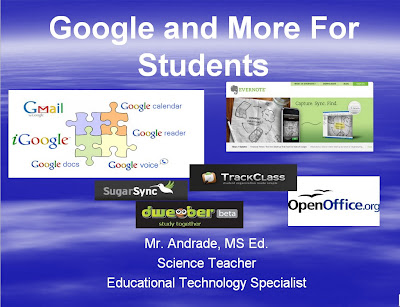
I created a Google Presentation about Google and other free applications and resources for students that I will be sharing with my students next week. I feel that these are the tools and resources that will be the most useful to them, with the shortest amount of training time required.
I thought I would also share it with you. You can view it HERE.
Please share your favorite student resources with us!
Monday, October 4, 2010
NASA Aerodynamics resources - good for all classes!
NASA's Glenn Research Center has a huge amount of resources for teachers to use in class. The Aerodynamics section is truly amazing.
They have Science Fundamentals (Newton's Laws, Equilibrium, Torques, Phases of Matter), Math Fundamentals (Area, volume, vectors, trigonometry...), Airplane parts, Aerodynamics, Model Rockets, and much more.
Many of the topics are set up in a lesson type format. Students can just click "next" to proceed through the section. There are even interactive demos and simulations available. And all of it is for free.
They also have the Beginner's Guide to Aeronautics (BGA) which was created as a Web-based "textbook." The creation of the BGA is a research project to explore the use of the personal computer and the Internet to present educational materials to students, teachers, and lifelong learners in a more interactive way than a printed, bound textbook.
The material is good for Middle and High School students, but teachers can use parts of it for any level of class.
I use it as a great primer on Newton's Laws, and also use it for our Rocket's lesson at the end of the year. The nice thing is that when you apply all of these topics to aerospace topics, the students are more engaged than they would be by the topic itself.
Some more NASA Education Sites:
Share your NASA resources with us!
Wednesday, September 29, 2010
10 Great Free Resources from Discovery Education

Discovery Education is an excellent resource for teachers. Many teachers know about Discovery Streaming, the Discovery Channel, or even Discovery Middle School Science. All of these are fee based services, but Discovery Education also has some great free resources for any teacher. Here are my top 10 (out of the 25 or so they have that are free).
1. Web 20.10 - http://web2010.discoveryeducation.com/ - Access great content on Internet Safety, Media Literacy and links to Web 2.0 Tool. The site is rich with little flash videos detailing the explanation and use of Web 2.0 Tools in the classroom. This is a great resource for new teachers and veterans to learn about Web 2.0 tools.
2. New Teacher Survival Central - http://discoveryeducation.com/survival/ - Includes Tech Tools for teachers and students, New teacher blogs, classroom tools, and curriculum resources, Tips/tricks on: Classroom Environment, Classroom Management, Parent Communication, Cool tips on Green Screens and more!
3. Science Fair Central - http://school.discoveryeducation.com/sciencefaircentral/?campaign=SFC - Great ideas how to create, launch and facilitate a Science Fair, including tips and ideas for student projects.
4. Discovery Education Lesson Plans - http://school.discoveryeducation.com/lessonplans/ - lesson plans for all different subjects, sorted by K-5, 6-8, and 9-12.
5. Siemens STEM Academy - http://stem.discoveryeducation.com/ - Premier online community designed to foster student achievement in Science, Technology, Engineering and Math through the collaboration of STEM educators and sharing of best practices. Great resources, ideas, and more.
6. Kathy Schrock's guide for Educators - http://school.discoveryeducation.com/schrockguide/ - Kathy Schrock's Guide for Educators is a categorized list of sites useful for enhancing curriculum and professional growth. It is updated often to include the best sites for teaching and learning.
7. Science of Everyday Life - http://scienceofeverydaylife.discoveryeducation.com/ - Everywhere you look, there are wonders both big and small just waiting to be explored. Your school, your home, and your community are all boundless laboratories full of mystery, excitement and surprise. Join us as we uncover the magic all around us and tap the innovator within us…in the Science of Everyday Life. What a great way to connect science to students' lives and experiences by connecting science to everyday things.
8. Worksheets to Go - http://school.discoveryeducation.com/teachingtools/worksheetgenerator/wtg/index.html - great worksheets and activities for teachers to use. Sorted by subject and topic.
9. Puzzlemaker - http://puzzlemaker.discoveryeducation.com/ - create your own puzzles. Create and print customized word search, criss-cross, math puzzles, and more—using your own word lists.
10. NASA at 50 - http://discoveryeducation.com/NASAat50/ - NASA at 50 highlights key innovations and milestones in chemistry, physics, engineering, and space exploration from NASA's fifty-year history. Each clip serves as a gateway for further learning in science and history and promotes critical thinking and inquiry as essential components of scientific literacy.
Students can enjoy NASA at 50 in video or audio formats that are compatible with common portable media players. In addition, teacher's guides are provided for each clip to facilitate integration of this exciting and engaging content into lesson plans.
Training resources for using Discovery Education resources:
Discovery Education Training Resources on Educational Technology Guy.
Lots of resources, articles, how-to’s, links, and more.
Monday, September 27, 2010
Google Apps Education Training Center
The Google Apps Education Training Center is an online learning environment dedicated for educators and students to learn how to effectively use Google Apps in an educational context. In other words, it provides training materials to learn how to use Google Apps in education.
While you don't need a Google Apps account to use this site, it is recommended so that you can experience what you learn. Of course, if you have a Google account you can use many of the apps anyway.
This is a good resource for teachers and students whose school system uses Google Apps or for any teacher or student who uses Google's applications for school.
A Media Specialist's Guide to the Internet
A Media Specialist's Guide to the Internet is an amazing resource I recently found out about.
The site has a huge number of resources and web links for teachers, sorted by school age group - elementary, middle and high school.
In addition, the main page of the site is a blog and the author posts news and new resources in this space.
This is a great place to start when looking for internet resources for your class.
The Biology Corner
The Biology Corner is a fantastic web site my wife found this weekend. The site has resources for teachers including lesson plans, web quests, quizzes, and much more. The site is set up by "class" - Anatomy 1 and 2, AP Biology, Biology 1 and 1a, Biology 2 and 2a, and Physics.
Worksheets are also sorted by topic, and images and media have their own menu.
The material is very useful and I like the class format for the resources. It is set up sequentially and allows for easy scanning for resources.
DIGITAL LEARNING ENVIRONMENTS: Web 2.0- for science
Digital Learning Environments is a site sponsored by HP and Intel that offers resources and ideas for teachers on how to use technology in education. There are some great ideas and lesson resources for all teachers on the site.
This page of the site has a listing of Web 2.0 resources to use in Science Classes. Resources listed include a varitey of sites listed by subject. There is a brief description about the site and how it can be used in the classroom.
I recommend this page for all science teachers and Digital Learning Environments in general to all educators as a must have resource.
Connecting Student Learning and Technology
Connecting Student Learning and Technology is a web resource for teachers that shows ways to use technology in education to address the diverse needs of our diverse student population.
The site refers to constructivism a lot, but even if you don't follow that line of thinking the site has some great resources. There are references, classroom activities, lists of technology and how to use it in the classroom and much more. It is a good place to start when trying to decide on how to use technology in your classroom to enhance learning.
Thursday, September 23, 2010
Latest resources I've posted on Twitter
Latest resources I've posted on Twitter:
Great article from @jasontbedell on Reflective Educators (rest of his recent articles are great 2!) must read.
NASA Planet Profile via @tl
RT @Brian_ThomasTCI: Cell phone policies relax as Cincy area schools use cell as instructional tool!
Upcoming Conferences in CT and NY that I'm presenting at and attending - come join us!!
Pictures of my classroom taken with my @palm #pre. Gotta love that camera.
RT @garystager: The Washington Post calls out Oprah and Michelle Rhee on their BS - http://bit.ly/92T8LB - great article!!
RT @nealchambers: Should Companies (and schools) have nap time? http://su.pr/3zn7T1 | - nap time for students and teachers too.
Tech Tip - How to Take a Screen Shot - http://www.180techtips.com/14.htm - #edtech, #techtips
RT @web20classroom: 10 PBL Resource That Put Students In The Center Of Learning: http://bit.ly/94q1u1
RT @web20classroom: How To Teach For Jobs That Don't Exist | Dangerously Irrelevant http://bit.ly/9cbMqs
RT @Curriki: Education Technology resource that are Free, Easy and Essential: wikis, blogs, wolfram, sketchup, podcasts http://ow.ly/2GE0O
Tech Tip - scheduling an email - http://www.180techtips.com/13.htm - #edtech, #edchat
TechForum NY 10/22/10 - Tech&Learning Magazine - great conference with great sessions. http://goo.gl/IaRd #edtech, #education, @tltechforum
The webOS 2.0 developer opportunity: genuinely unique apps - http://goo.gl/6nde - @Palm, #webOS, #Pre, #Pixi, #technology, #smartphone
@DEN Fall Virtual Conference - http://goo.gl/5odY - Sat, Oct 23rd. Free - great resource for all teachers. #edtech, #education
Tech Tip - computer password advice - http://www.180techtips.com/12.htm - #edtech, #technology
RT @kylepace: Using Video Games As A Teaching Tool: http://ow.ly/2FIPH
CT Day of Discovery - free Discovery Education Conference - http://is.gd/febPs - Sat 10/16/2010 - learn how to use DE in your class #edtech
Googlios: E-Portfolios on Google http://is.gd/feGCP
RT @HP_PC: Check out the cool new features of the @Palm @WebOS, & learn what "stacks" are: http://nyti.ms/9XIdnI (via @nytimes)-love my Pre+
Wednesday, September 15, 2010
Drop.io - online collaboration and file sharing
Drop.io is an online collaboration and file sharing service. The free "drops" have 100MB limits, but you can purchase more space. 100MB is actually a lot of space. 30 lab reports only used 15 MB.
Drop.io allows users to have a simple, real-time, private online chat and share digital content (images, videos, documents and more). Each drop is non-searchable and non-indexed, can be password protected, and can even expire after a certain amount of time.
You can create a drop from the home page without creating an account or signing up. It is a very simple task and easy to use. You click on "Create a Drop" and then enter your email and they send you the link and password. That's it.
The "About" page on their site is actually a dropped document. It's interesting to see how they did it.
It is a very powerful, easy to use system. You can learn more about how to use it HERE.
I currently use it as a place for students to submit work to me without having to email it to me. I have placed a drop.io button on my classroom blog so the students can easily find it. I am just starting to explore the online chat and will also be using it to return students' electronic documents back to them with comments and grades. (you can also see the subscribe via email box on the class blog site. This site has assignments, due dates, resources and more and by subscribing to it, students get emails when ever I update the site) You can visit my Physics class blog site at: http://mrandradesphysics.blogspot.com/
"Submit Work to Mr. Andrade" sends their files to the drop.io "drop" I created. They click "add files" and it brings up a file explorer window, click on their file, and that's it. The file is sent to the drop for me to go and review and get.
Try it out.
UPDATE: Drop.io has been purchased by Facebook and is no longer available. Try out DROPitTOme as an alternative.
Subscribe to:
Posts (Atom)