
Many school system block Youtube because of the multitude of bad videos on there. The problem this causes is that teachers can't show the good videos in class. And there are a lot of great videos on YouTube that teachers can use - lectures, demonstrations, news, and more. I've had many teachers ask me if there is a way to save the video at home and then play it at school. Here is my way of doing it, there are others. Everything I list is free.
Google owns YouTube, so even Google Video is blocked.
1. You need a way to download the video. I use a user script in Google Chrome to do this. You can find the script and instructions HERE. You then go to the YouTube video and click the bookmarklet that you just created and the video will download.

If you use Internet Explorer v7, you should download and install IE7Pro. Then, follow these instructions to set it up to allow you to download YouTube videos. When you go to the YouTube video you will see a "download video" link on the web page near the video information. Click on that and save the video.

2. Now, the videos you just saved are in .flv format (Flash Video). You will want to convert them to play directly on your media player. Since we are talking about Windows (since I don't use a Mac) you should convert the video files into Windows Media Player files. Windows Media Player is on all Windows computers.
To convert the videos I use WM Converter. It can be downloaded for free HERE. The other sites are blocked at my school, but you can also try THIS ONE and THIS OTHER ONE.
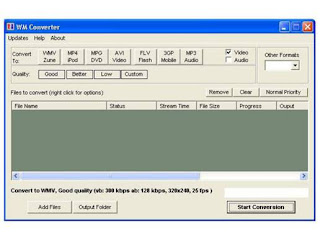
Open WM Converter, select your input file (the video) then click on "convert to WMV/Zune" and "quality - Better". Select "convert" and let it run. You should also select your location for your converted files before converting.
You now have a YouTube video file that you can put on a CD, Flash Drive, email to yourself, or post to your site and then download at school to use.
It would be easier to just be able to play the video from YouTube, but, alas, that is not an option at many schools.
Good luck.


